We are a non-official WOW website that is not funded, so your Pro subscription helps us continue to provide resources for people looking to improve their Clan Battles skills.
Membership includes supported surface-ship aiming estimates and recorded Clan Battle playback. AI replay features are experimental previews. Review supported features before subscribing.
SEE PRO IN ACTION
Better shots. Smarter battles.
25-second tour
Watch Montana take aim at Tallinn, follow a recorded battle, and preview AI team compositions.
Put your ship’s guns against the target you expect to face. Change the angle, ammunition and range to study which exposed armor offers a useful shot—and when another target area is a better choice.
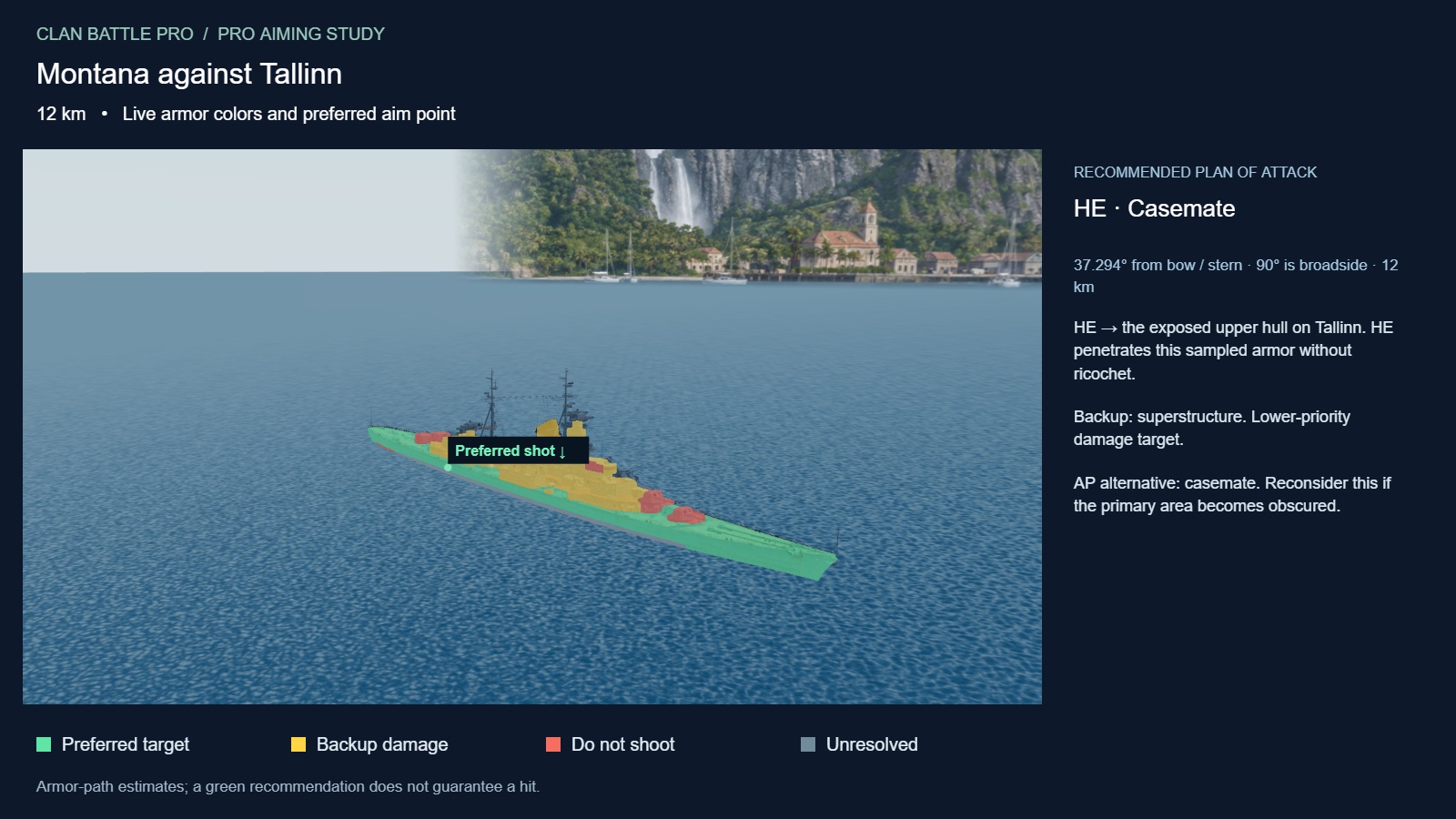
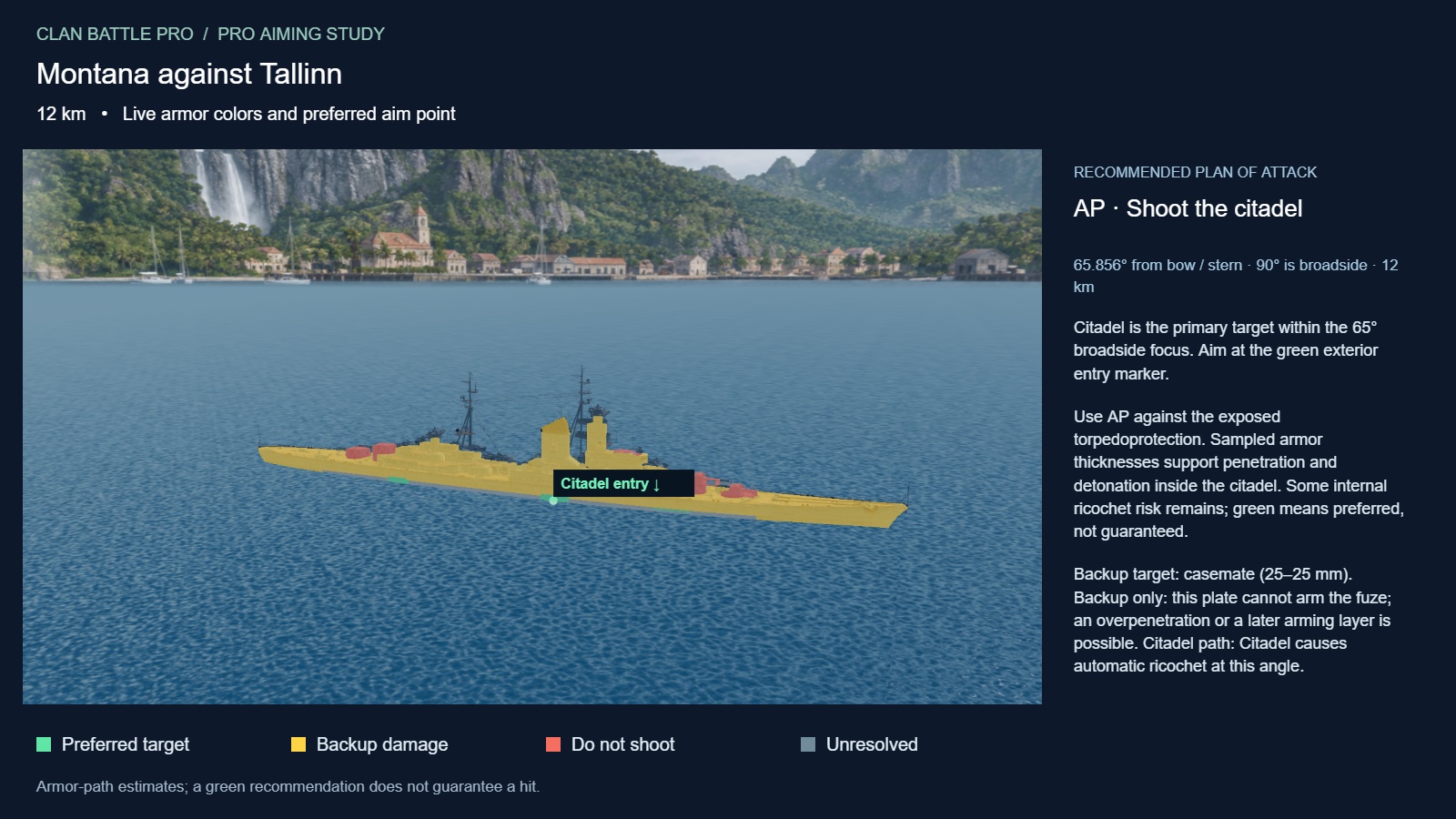
Study an angled target. See a recommended shell, preferred aim point and backup area, with the reasoning alongside the ship.Rotate to reveal an opportunity. In this captured matchup, the advice changes to AP and marks an exterior entry point for a supported citadel shot.
Captured Pro study views: Montana → Tallinn, 12 km. Recommendations depend on the exact angle and armor path; a broadside target does not always mean a confirmed citadel hit. Open either image for a closer look.
Choose your matchup
Select the firing ship and target independently. Use the selected ship’s main-battery shell data to study a specific opponent instead of relying on a generic aiming rule.
Read the changing aim colors
Rotate the target to see the recommendation update. Green marks preferred targets, yellow backup or conditional shots, red areas to avoid for direct damage, and gray unresolved armor. The labeled marker shows where to place the shot.
Compare HE and AP
The lower Angle & Ammunition Study compares the available shells side by side. Review the recommended ammunition, primary target, alternatives and reasons. The upper aiming coach evaluates the ammunition you select.
Find a supported citadel entry
Inspect the citadel’s location, then look for a supported path through the exterior armor. Guidance considers penetration, intervening armor, ricochet, fuze arming and shell travel before recommending a citadel shot or a regular belt penetration.
Inspect the armor itself
Switch between In port, Armor layers, Citadel and Full-pen study. Orbit, zoom and click a plate to inspect its zone, available thickness information, waterline position and impact angle. Compare both shells against a selected plate in the lower study.
See what range changes
Adjust firing distance to compare available penetration, shell speed, flight time and fall-angle estimates. Study when AP becomes less effective and review flight-time guidance when available. Camera height and zoom are for inspection; target bearing and shell descent inform the armor assessment.
Explore the full ammunition and ship-data breakdown
Damage and rate of fire
Listed shell damage, nominal regular-penetration and overpenetration damage, salvo ceiling, nominal damage per minute, barrel count, reload time and base maximum range.
Penetration and shell behavior
Penetration at range, impact speed, flight time, fall angle, ricochet thresholds, overmatch limit, fuze arming threshold, fuze delay and normalization.
Projectile specifications
Caliber, shell mass, muzzle velocity, Krupp coefficient, air drag and base HE fire chance, where the imported data provides them.
Ship reference library
Search imported ship specifications, including hull, weapons, torpedoes, AA, aircraft, consumables and modules where supplied. Download the complete ship record and imported equipment, commander and signal references.
Turn a matchup into a practice plan
Choose both ships. Set the range you expect to fight at.
Rotate through the engagement. Compare the advice as the target angles in, opens its side and angles away.
Inspect the recommended shot. Check the marker, shell choice and armor explanation before taking the lesson into battle.
Pro provides calculated aiming estimates for supported surface ships with validated armor and available shell data. Missing values stay unresolved. Dispersion, saturation, fires, water-entry shots and equipment or commander effects are not fully simulated; nominal damage is not a promised hit or damage result.
02 / BATTLE SIMULATOR
Follow the ship. Understand the round.
Turn a supported Clan Battle replay into a visual review of positioning, engagements and individual contributions. Follow a player through the recorded action, then connect their decisions with the results the replay captured.
A closer view of the round. Follow Stalingrad in this captured replay view while keeping both team rosters, the tactical map and individual combat statistics within reach. Click Play to watch the 10-second demonstration.
Review the updated 3D graphics
Textured ship exteriors, reconstructed island terrain and ocean scenery make ship orientation and positioning easier to read. Watch gunfire and torpedo activity alongside the action. Separate turrets animate on supported models; effects and terrain are a custom reconstruction.
Focus on an individual ship
Select a ship from the roster or tactical map to follow it. Orbit, pan and zoom to inspect its angle and surrounding battle, then return to Overview to understand how it fits into the team’s formation.
Follow its recorded path
Replay the positions the recording actually captured to study pushes, retreats, rotations and approaches to objectives. The player preserves recorded routes even where reconstructed shorelines differ. Unseen enemy movement is not invented: a visibility gap can leave the camera waiting for the next recorded sighting.
See its contribution develop
The selected ship’s panel shows observed damage, ships destroyed and last-recorded health through the current replay time. Expand Combat statistics for more available details, then move through the round to see how the recorded contribution changes.
Connect actions with the team result
Track recorded team scores, objective status and ship losses. Expand Team damage & achievements to compare recorded contributions across the rosters. Move to the end of the timeline to review the totals captured by that replay.
Revisit the decisive moment
Pause and seek to a specific point, or play at 1×, 2×, 5× or 10× speed. Rewatch an engagement from a different ship’s perspective to discuss positioning, support and timing with your clan. Performance quality is available for smoother playback on less powerful devices.
Explore the individual performance breakdown
Damage and engagement results
Observed damage dealt, damage received, enemy ships damaged, ships destroyed and observed kill assists. Assists identify enemies damaged before an ally destroyed them; they are not official ribbons.
Support and pressure
Spotting damage and potential damage where available in the decoded recording. Review these alongside the ship’s position to understand contributions beyond direct damage.
Weapons and consumables
Observed shell traces, torpedo tracks and radar, hydro or speed-boost uses, with active ability timers where recorded. Traces and tracks are observations, not confirmed hit counts.
Clear limits on achievements
Missing statistics display “Not available.” Ribbons, medals, citadel-hit counts, fires, floods and other unrecorded achievements cannot be reconstructed into a complete official post-battle report.
Turn a replay into a clan review
Load the round. Try the free sample or upload a supported Clan Battle .wowsreplay file.
Choose the player to study. Follow their recorded movement and pause at the engagement you want to discuss.
Compare decisions and contributions. Check their statistics at that moment, switch to a teammate, then review the end-of-round recorded totals.
Playback depends on supported replay versions, maps and ships. It shows what the recording observed, which can be incomplete. Hidden positions and missing statistics stay unavailable; reconstructed effects are not the original game physics or renderer.
03 / AI REPLAYS Coming soon
Try the lineup before battle night.
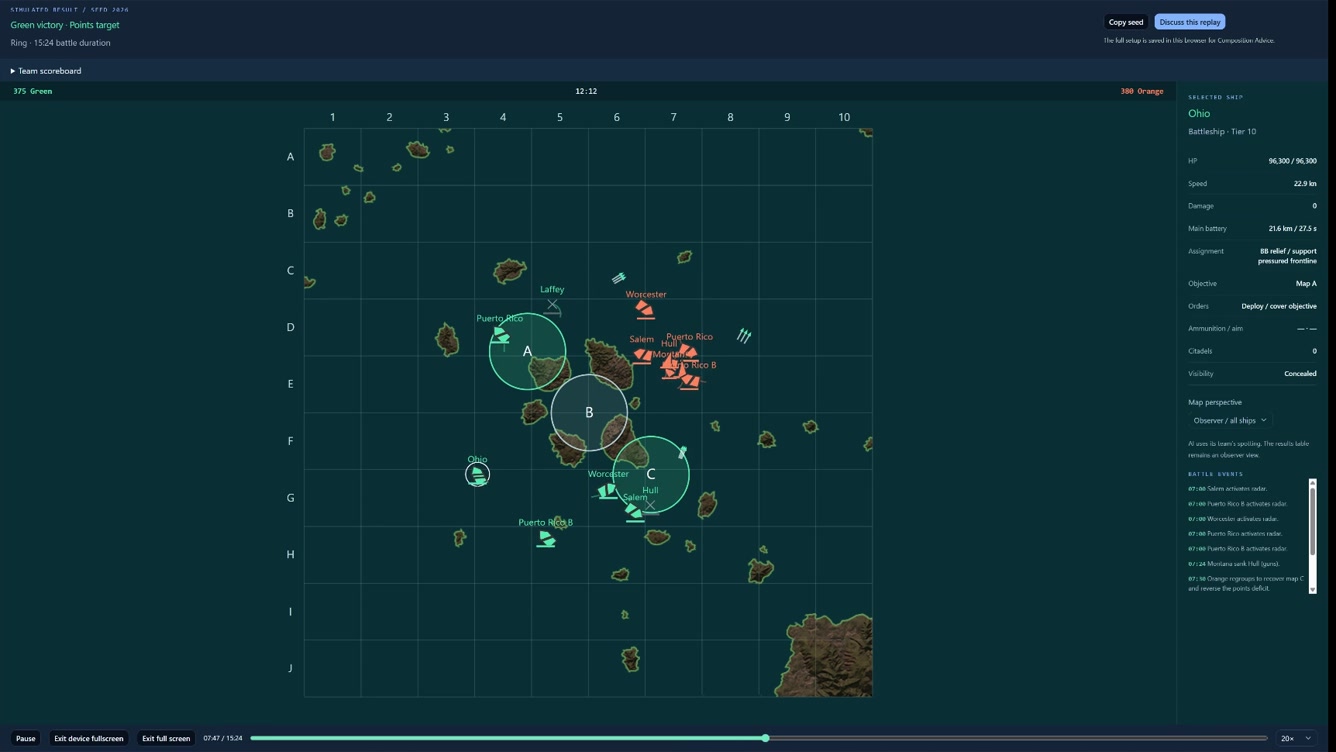
Preview simulated matchups to explore team compositions before taking them into the game. Follow ship movements, objectives, and battle events as the scenario plays out.
Explore different team compositions
Review simulated tactical decisions
Planned for Pro members
06 / MY CLAN · INCLUDED WITH PRO
Prepare together. Review every battle night.
Bring your clan’s reports, lineups and tactical plans into one workspace. Pro gives each member the tools to prepare for the next round and learn from the last one.
Clan Reports · Your saved battle nights
Import a ZIP of supported Clan Battle replays into your private clan archive. Browse all stored nights, filter by month and select green calendar dates with imported battles. Duplicate recordings are detected before repeat uploads.
Executive summary · Alpha & Bravo
See each division’s wins in green, losses in red and rounds played. Compare starting and finishing ranks with Squall, Gale, Storm, Typhoon and Hurricane emblems, plus changes from the preceding battle night where saved scoreboard history is available.
Battle reports · What the recording shows
Review team rosters, ships, observed damage, kills and losses. Inspect opening-position evidence, engagement timelines, score progression and capture activity. Confirmed results are distinguished from recordings that do not establish a winner.
Clan Lineup · Prepare your roster
Coordinate battle-night availability and player ship options. Leaders build and save lineups, assign players and ships, and share links for review. Keep planning notes and roster details within the clan’s existing permissions.
Tactical Maps · Build a plan
Plan on seven supported CB35 maps with verified opening layouts. Assign ships and clan nicknames to either team, work across three phases, place routes and headings, and add arrows, lines, circles or freehand notes. Expand the map and toggle either team’s visibility.
Ranges, strategies & clan review
Display reference detection, radar, hydro, gun and torpedo ranges. Start from a suggested strategy or build your own, then save named private plans, export or import plan JSON, add revision-linked comments and move plans through Draft, Ready and leadership approval.
One Pro membership. All three My Clan sections.
Active personal Pro, Permanent Pro and valid funded Team Pro access qualify. Every person opening these tools—including shared lineup views—needs Pro. Clan membership and leadership permissions still control which private data you may view or edit.
Replay imports use your existing allowance and supported recording formats. Reports reflect available recordings; missing scoreboard snapshots cannot establish a night’s totals. Tactical routes, ranges and strategy suggestions are planning references, not a combat simulation or a guarantee of results. Pro does not grant access to another clan’s private data.
More with your membership
Aiming guidance for supported surface ships with available models and shell data
Supported Clan Battle replay uploads and sample playback
Custom “Pro Member” emblem on all of your Community discussion forum posts
Future features are not guaranteed or included until released
Donation
Support the website with an amount of your choice. Donations support the community and do not include a Pro subscription.
$
Make a single donation with no automatic renewal.
PayPal or credit/debit card through PayPal’s secure checkout. Card options depend on eligibility; PayPal may require an account for recurring payments.